Free and open source. No code needed.
hydraflow
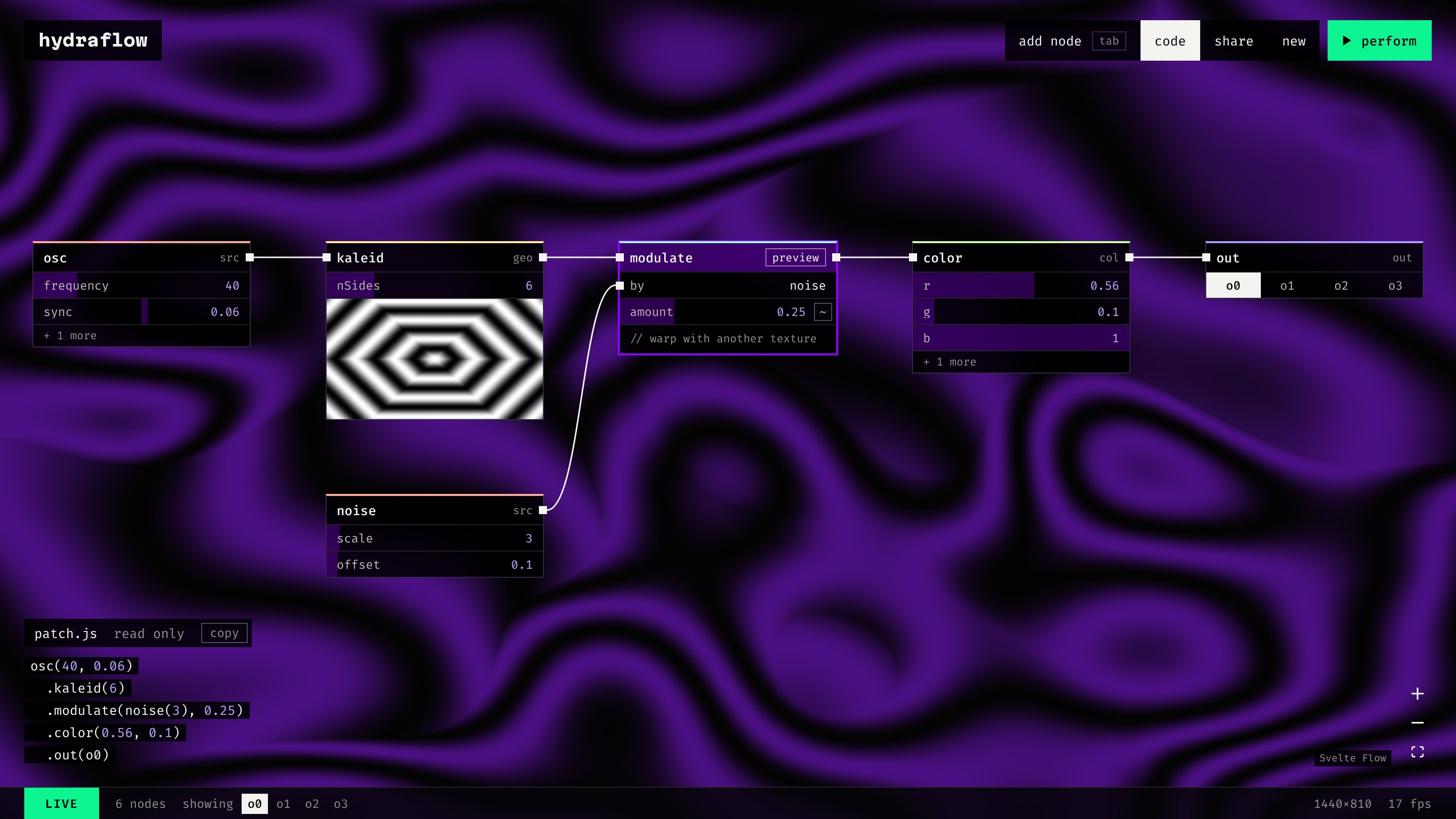
Play with hydra without writing code. Wire boxes together, drag the numbers, and watch the visuals change as you go.
Runs in your browser. Nothing to install, no account, and your patches stay on your computer.
mirror it around the centre
what plays behind this page
drag a number sideways
Boxes, wires and numbers
hydra is a video synth by Olivia Jack that people play by writing code. hydraflow lets you play it with your mouse instead. That's all there is to learn:
-
Add a box
Press Tab or double-click anywhere, then pick one:
oscfor stripes,noisefor clouds,shapefor a circle. Each box is one hydra function. -
Wire it up
Drag from one box's square socket to the next. The picture flows along the wire, and every box on the way changes it: turns it, colours it, folds it into a kaleidoscope.
-
Drag the numbers
Drag any number sideways and the visuals follow straight away. Hold Shift for small steps. Nothing breaks, and Ctrl/⌘ + Z takes anything back.
- Tab or double-click
- Add a box
- Backspace
- Remove what's selected; the wire closes the gap
- Ctrl/⌘ + Z
- Undo (add Shift to redo)
- Ctrl/⌘ + `
- Hide the editor and let the visuals fill the screen; Esc brings it back
Things to try
Start from the patch that's already there, or clear it and build your own. Either way, here's what's in the box.
-
Every hydra function is a box
About fifty of them. Their names, numbers and defaults come straight from hydra, so what you pick up here works in hydra too.
-
Your camera, screen and files
Bring in your webcam, a shared window, a photo or a video, and run it through the same boxes. Drop a file on the canvas and it's in. Your files stay in your browser.
-
Make it move
Press
~next to a number and it moves by itself: in steps, in waves, to the music or with your mouse. Anlfooraudiobox can drive several numbers at once. -
Peek inside any box
Turn on a box's preview to see the picture at that point in the chain. It's the quickest way to find out what a box does.
-
Share it as a link
The whole patch fits in a link. Whoever opens it gets your patch, ready to change. It travels in the link itself, so no server ever sees it.
-
Play it full screen
Hide the editor and the visuals fill the screen, for a projector, a stream or a recording. Your patch is saved as you go, so it's still there tomorrow.
The code was there all along
Every patch is also a hydra sketch. Press code in the editor and there it is, one
line per box, changing as you drag.
You never have to read it. But when you get curious, it's the gentlest way into hydra: you already know what each line does, because you built it.
noise(2.4, 0.08)
  .kaleid(5)
  .color(0.56, 0.1)
  .out(o0)
The patch behind this page, as hydra code. Drag a number in the boxes up top and watch this change.
Ready for more?
Copy the code into hydra's own editor, or into HYDRACTRL, hydraflow's big sibling for playing hydra live: saved scenes, MIDI, a proper code editor and a desktop app for VJ software.
New to hydra?
- hydra documentation The official guide, gentle from the first page.
- Function reference Every hydra function, so every box, with examples.
- hydra internet garden What the community makes, and how.
- hydra book A thorough guide by Naoto Hieda.
Built with
- hydra by Olivia Jack
- Svelte Flow for the boxes and wires, in Svelte
- Vite and Bun
- Martian Mono by Evil Martians and Fira Code by Nikita Prokopov